

Shubham Singla
At powerplay, we admire experiments a lot, we build the hypothesis, work upon it and test it live with the user. As a part of implementation POD of the product team, I also got the chance to build & run experiments. Initially when I joined Powerplay, I was little nervous because of the two reasons, the very first was obvious as it was my first PM job and the second is the construction industry. I came from an Ed-tech B2C field & I have no idea how does the contruction + SaaS industry looks like.
But, who knows learning new things could be so interesting. I was able to run experiments own my own and then looking through data gives me goosebumps every single time & that’s a story for another day, but for now lets deep dive into the details of work :)
Probably you haven’t heard about Powerplay earlier, right? Powerplay is a construction management & communication mobile application. In simple terms consider it like Slack + Trello but for construction industry. I was highly influenced by the problem that they’re solving which I myself faced in my life. Powerplay helps to reduce the friction between the site team & office team so that they can collaborate effectively.
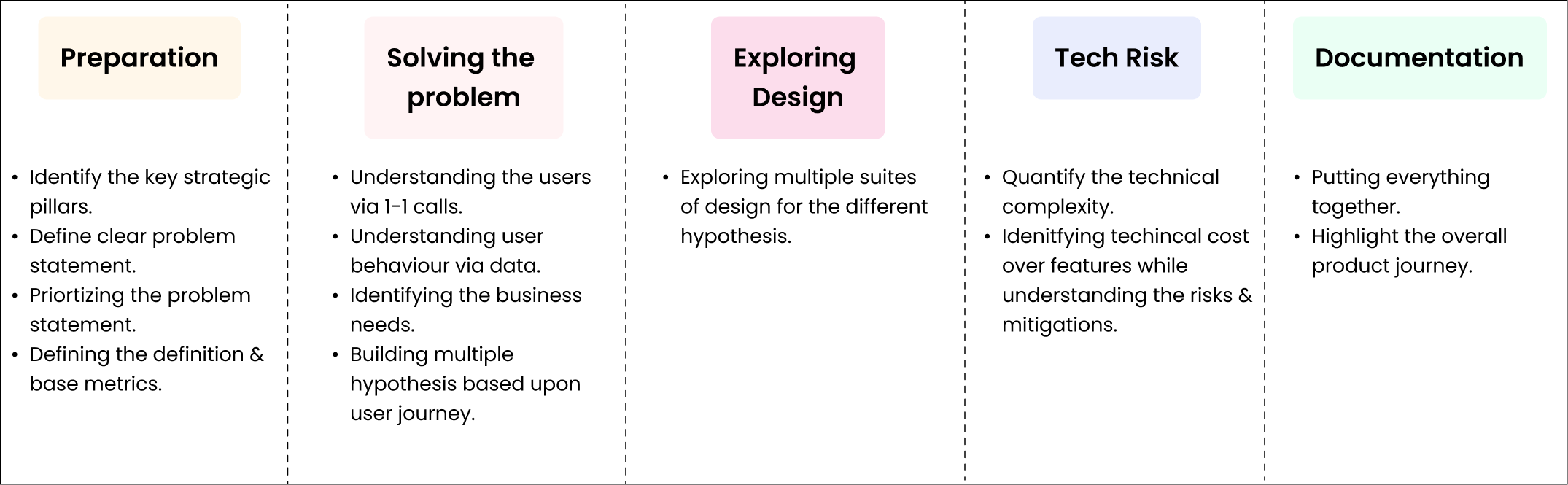
The process is simple, we first identify what’s the problem, then layout a Epic, map things with the definition of our Implementation POD, work on solving the problem starting with user research, putting down user journey’s, their goals & needs and finally the multiple solutions to test with the users. If I had to write it in the process, then it would go like -
Now as a part of Implementation POD, we have our definition with us and we need to move those numbers. So, we need to build the plan on how to improve these numbers. Our POD focuses on to make sure users make an investment in the product so that they are ready to get retained & became an active user in the product.
Okay let’s first understand a basic flow of user journey, so that you could have a better idea -
After this there are many more things a user does but here, I didn’t go into the much detailed journey as my POD comes under this journey only, when user created a site our main motive is to make sure user creates more tasks & realize the value of our application. Now to make sure user do the intended action, we devised a strategy.
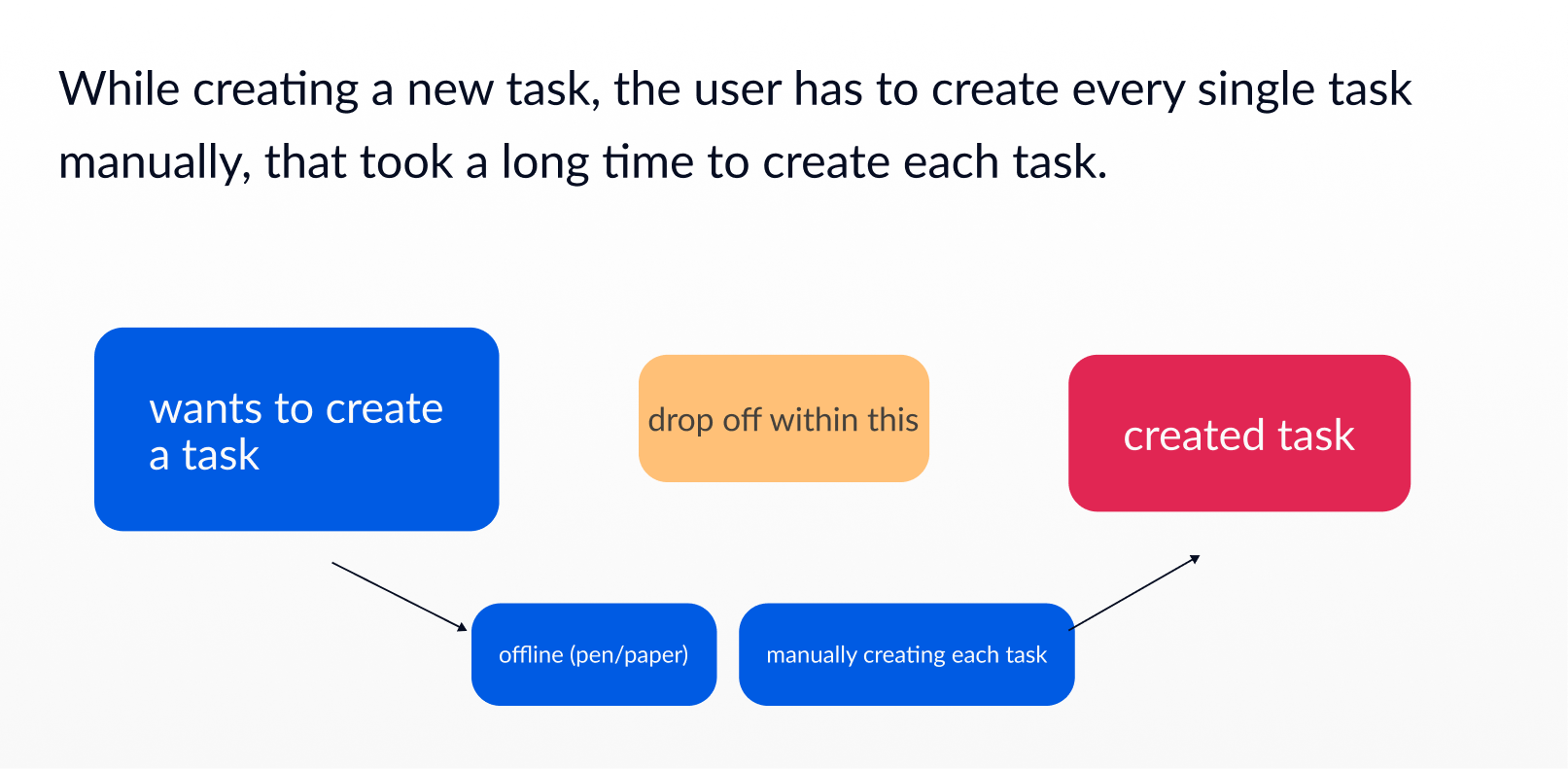
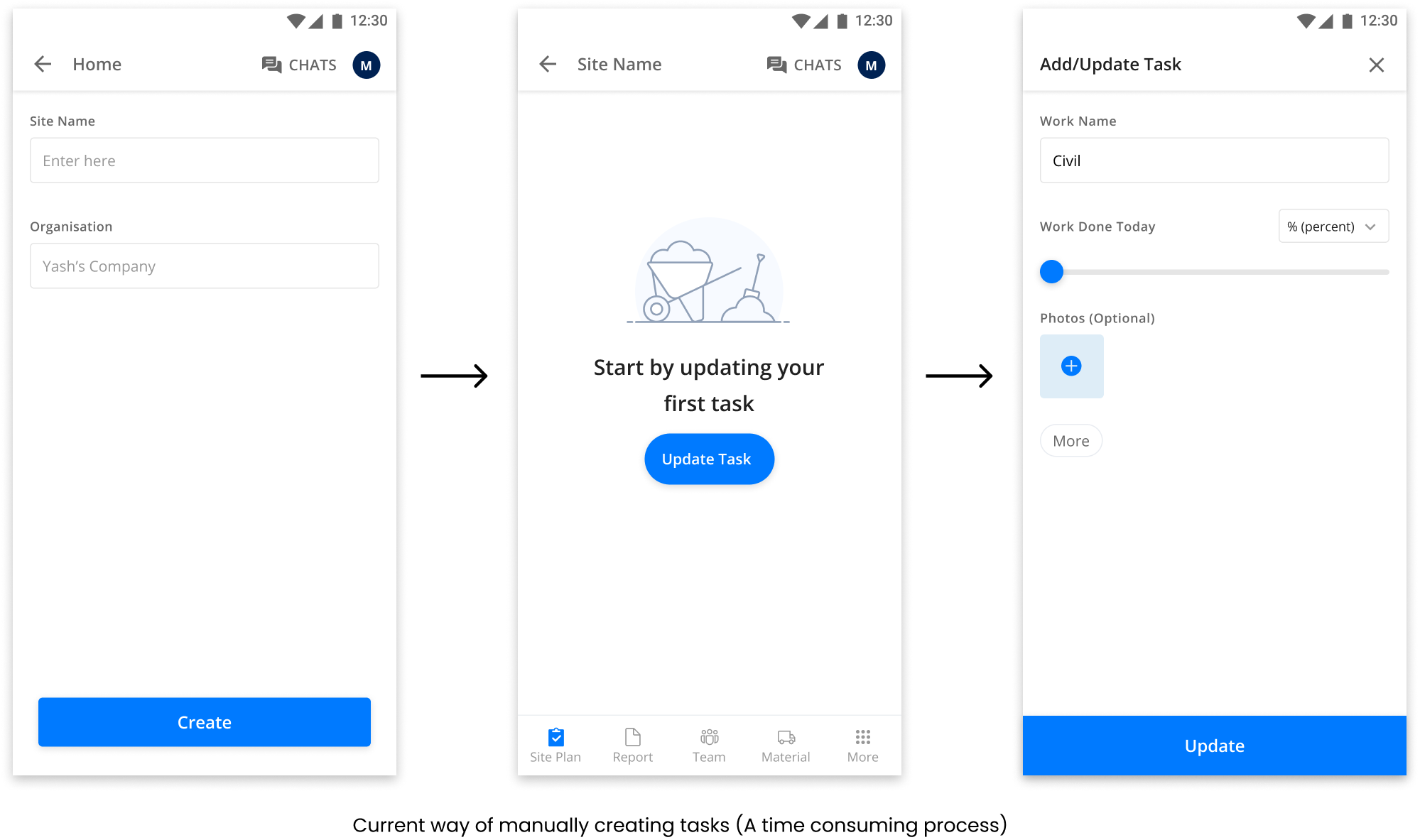
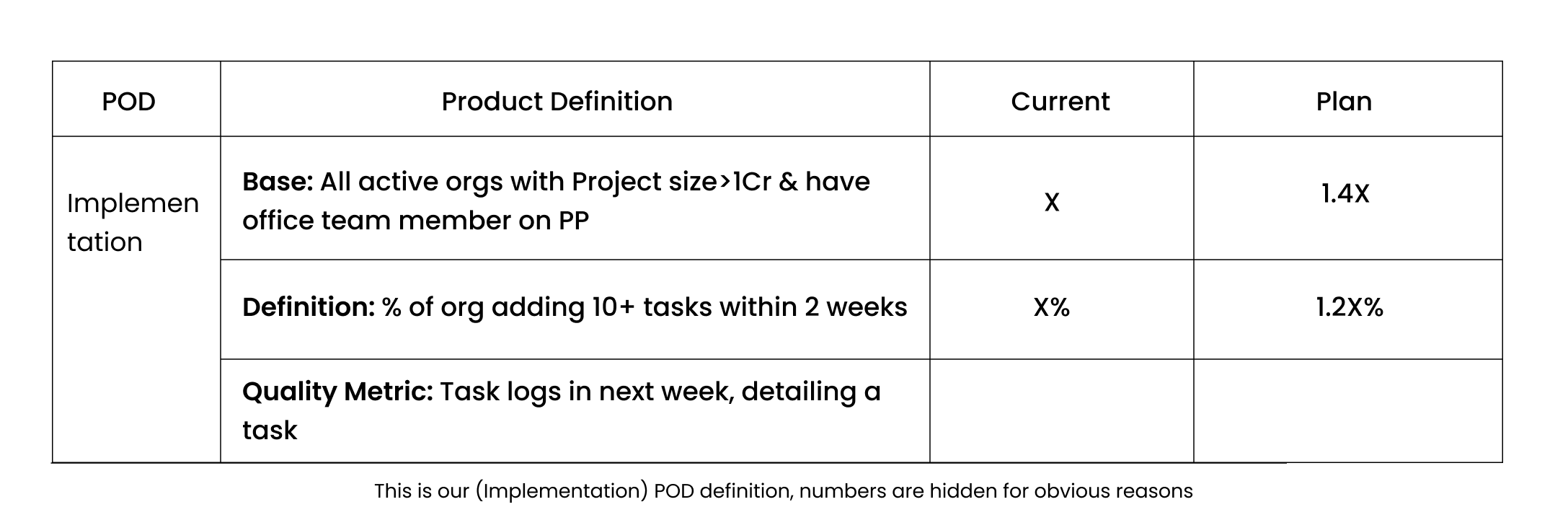
Along with providing value to our user we need to make sure user also makes an investment in our product . To do so, we came up with two major epics one is “Pre-built templates” & other is “Upload Plan”. Now by names it would be hard to identify what exactly are these, I’ll try to explain them below -
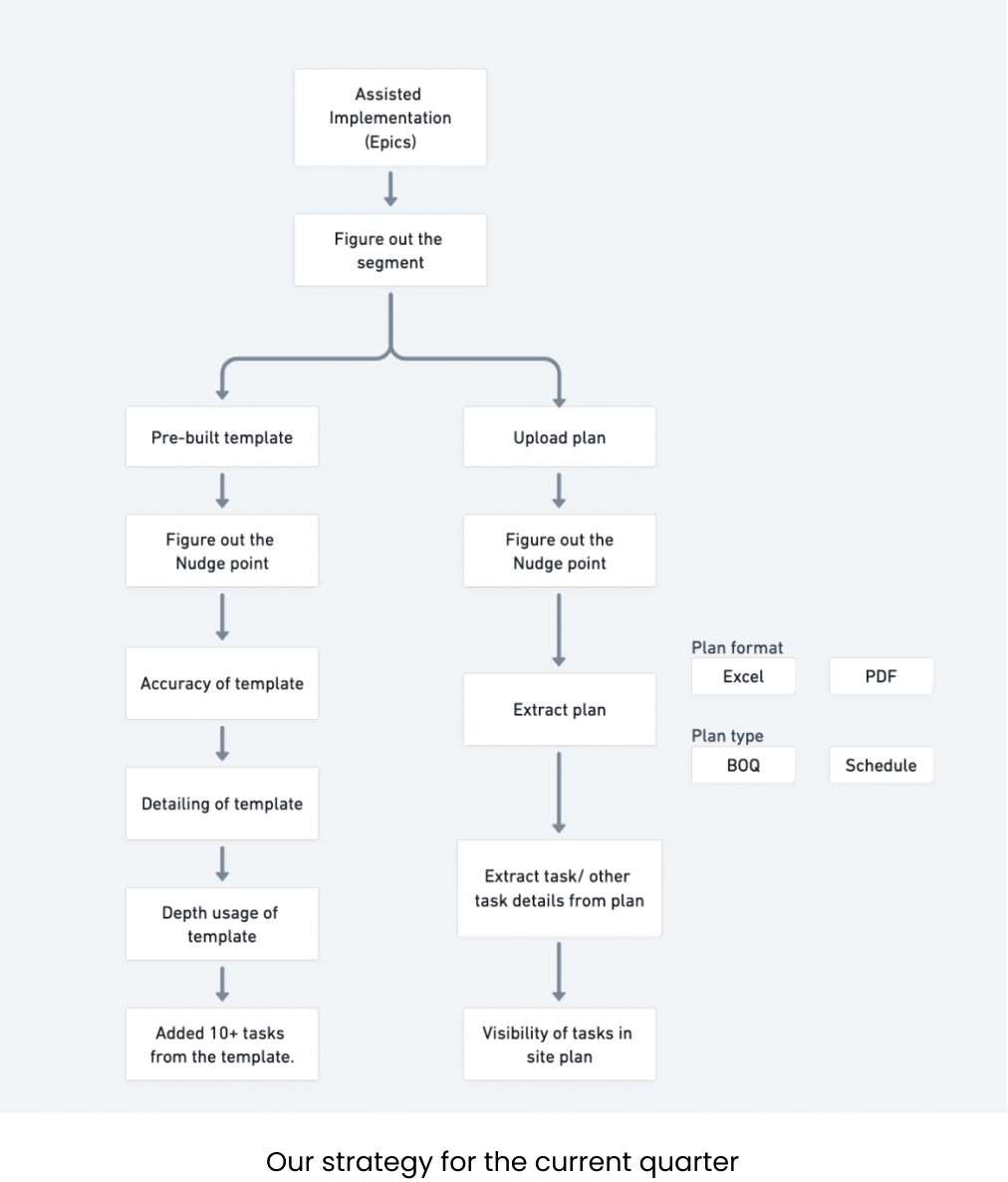
Pre-built templates - Currently user had to manually create every task and generally in construction industry there are a lot of tasks, so our assumption was if we help users built tasks easily with our templates then we can motivate them to build more & help them to stay active on the platform.
Upload plan - We found that users already had some site plans & tasks created with them either in the form of Excel or PDF which they used to communicate with other members of their team. If we were able to get them their plans uploaded on our application, then the burden of creating tasks from scratch would be over and they could easily use our application.
Currently, I’m working on Pre-built templates feature, so further would be explaining the same.
Now we have the problem, to solve the same we need to build hypothesis based upon user journey & insights. Before simply building the complete design, we also validated whether showing templates is a good idea or not? We build a small MVP to test the same and the numbers are good, then we proceeded with multiple nudge points and use cases.
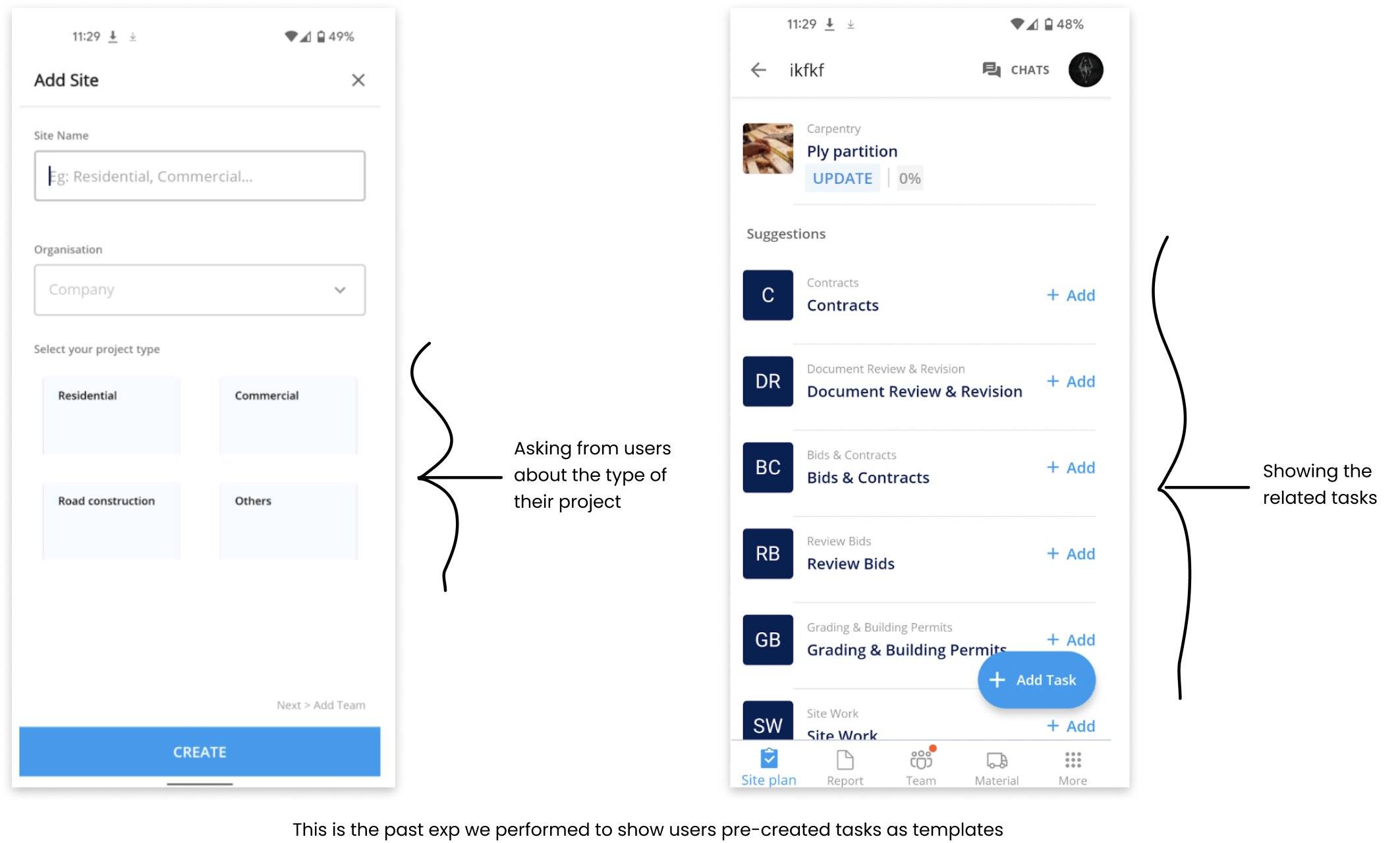
In the above experiment, the task accuracy is not that good, but we got to know user actually find them useful and to make it better, we decide to create different nudge points where it provides more value to user, also conducted user calls to get better clarity on the type of tasks. Also, we’re showing templates to these users once they at least added a single task.
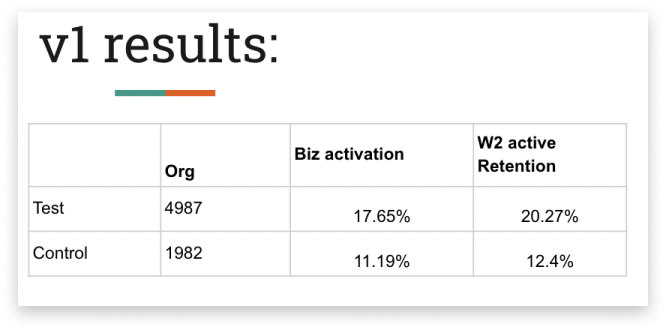
In this, “Test” is the data of the experiment and “Control” is the data of general flow. Clearly activation of the experiment is higher than the general flow over the same period of time.
Now after this there are certain places where we can provide different value to the user based upon multiple nudge points. To do the same, we need to identify those values and needs to show it to the user. The point is wherever we saw the more usage of templates, we could say that this is the place where user finds the more value and could be used further for 100% rollout.
For the very first time, we decided to go with showing templates to the users at the time of 1st site creation, reason being is this is already tested and had given good numbers, apart from that this is the place where there are more eyes and help us adoption in templates.
Hypothesis - “As a user, I know what tasks to create, but there are a lot of tasks to create manually, if I’m able to choose from predefined tasks list, then creating new tasks would be easy and effortless for me.”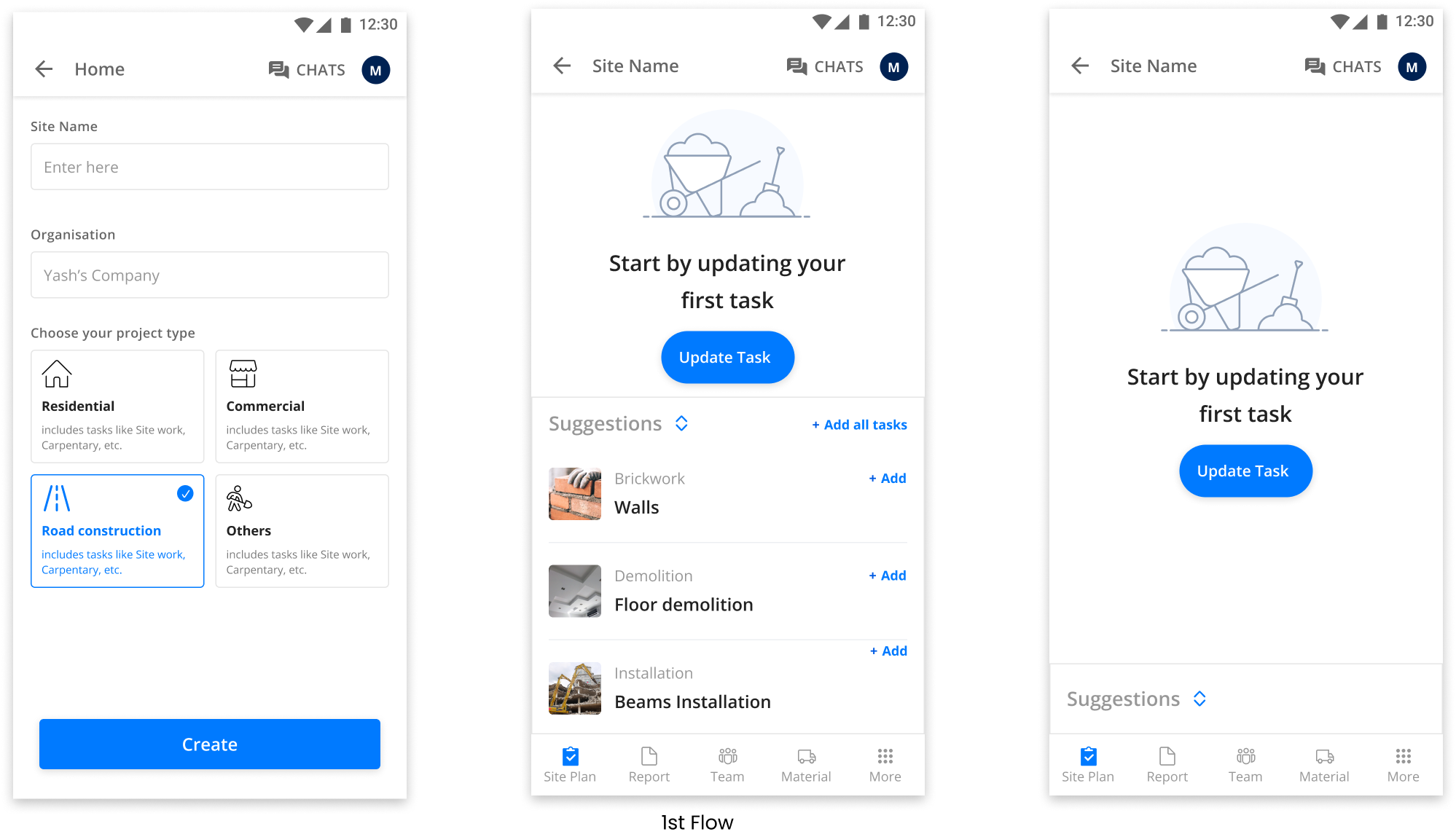
Certain changes that we did in this from the past exp is improvement in design + improvement in suggested tasks. Also, earlier suggestions are shown in a way, that it’s uncomfortable for the user and once canceled these couldn’t be viewed again. Now suggestions are shown in a way in which user can hide and open them as needed. Moreover, these suggestions would disappear once a user adds a minimum of 15 tasks or click on “Add all tasks”.
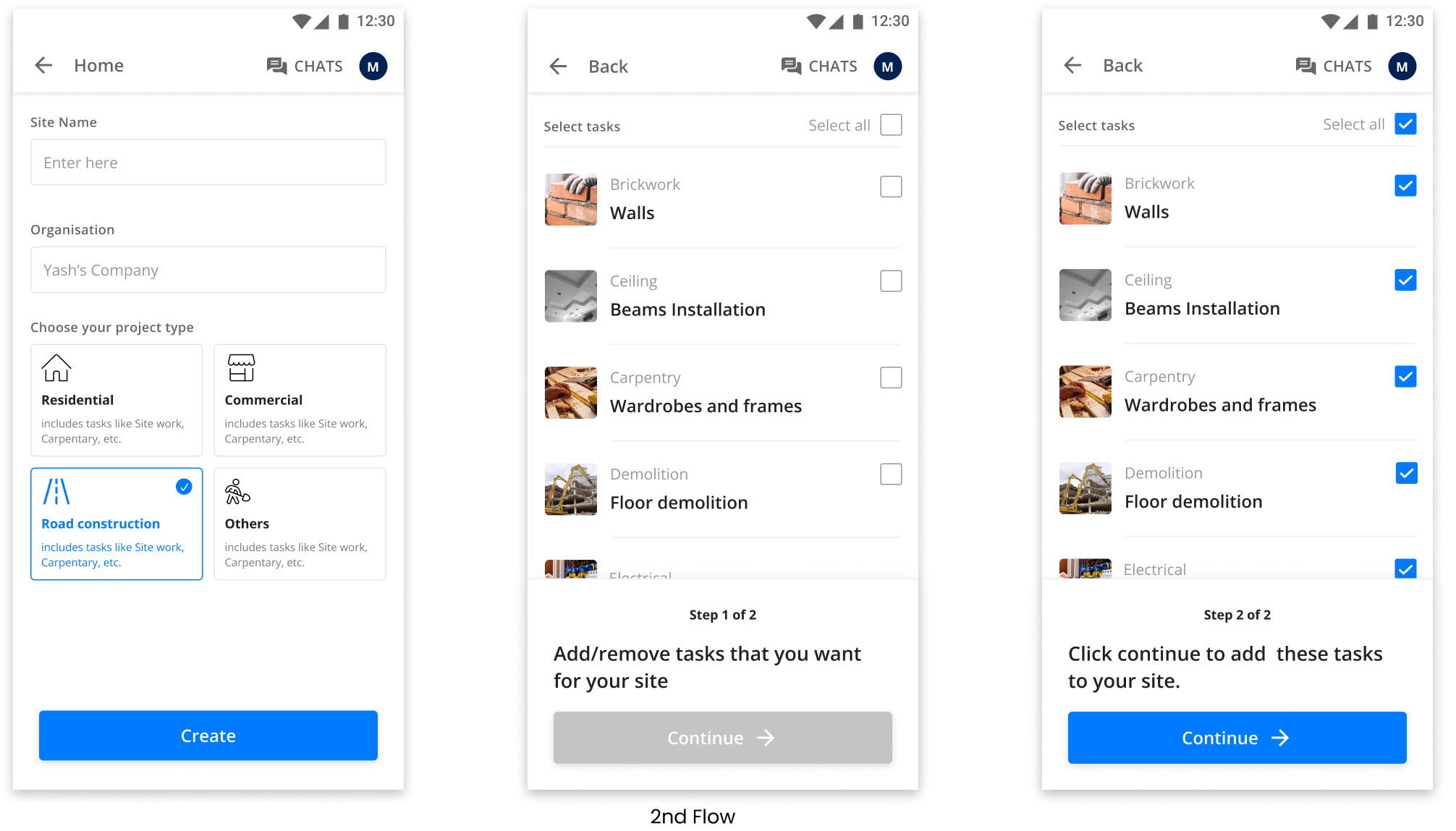
We have created two flows, to verify & understand at what placement or in which scenario the user tends to use templates more. The better we got implementation %, the better are the chances users would stick to the platform.
In the 1st scenario, we are showing suggestions to the user, allowing him/her to add tasks at any moment, while creating tasks. In the 2nd scenario, we’re asking users to pre-select tasks early and then showing selected tasks directly in the tasks list. (Here selecting at least a single task is mandatory to proceed for the user).
The 2nd version of the same was not prioritized for now, reason being is in this we are asking users to select at least one of the task initially to proceed, which is a risk for us, as if user doesn’t find a particular task then chances are high user won’t proceed further. Thus, we rejected this flow for the time being.
Now instead of showing templates on 1st site, our assumption is user had realised the value of PP and now starts creating 2nd site, but now it seems like a pain for user, as adding repetitive tasks is not easy for the user, so allowing users to onbaord tasks from past site well along with suggestions.
Hypothesis - “As a user, I want to create another site, but creating tasks from beginning is difficult, if I can edit/onboard tasks from my previous site, then I can create new site with easily and can explore more.”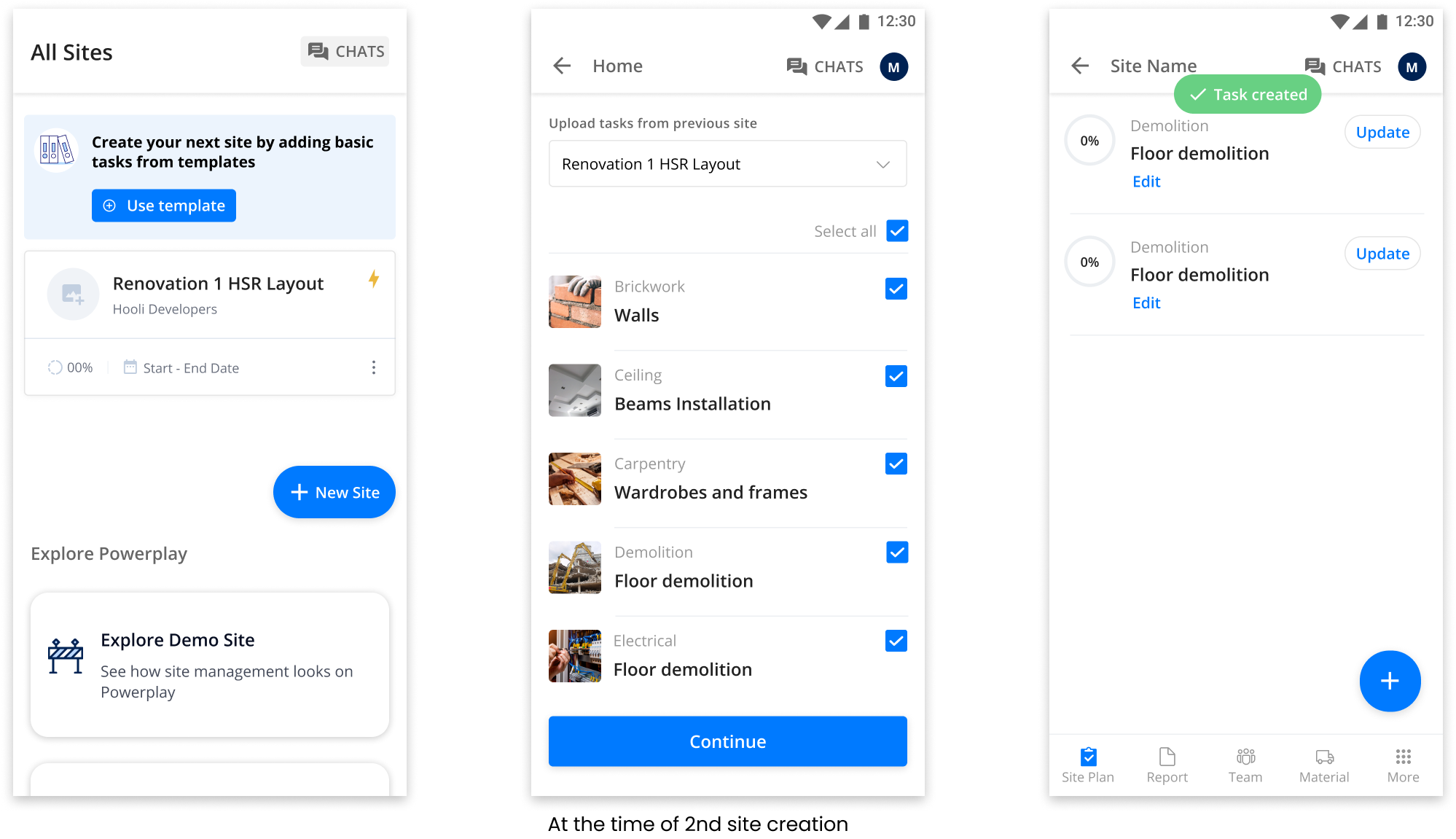
Again here our assumption is user had created one task and realised creating more tasks is hard, so if at the time when user had created his task, he would able to better realise the value of templates.
Hypothesis - “As a user, I created one task, but if I can create multiple tasks, then my chances of creating more tasks would increase and help me completing my project.”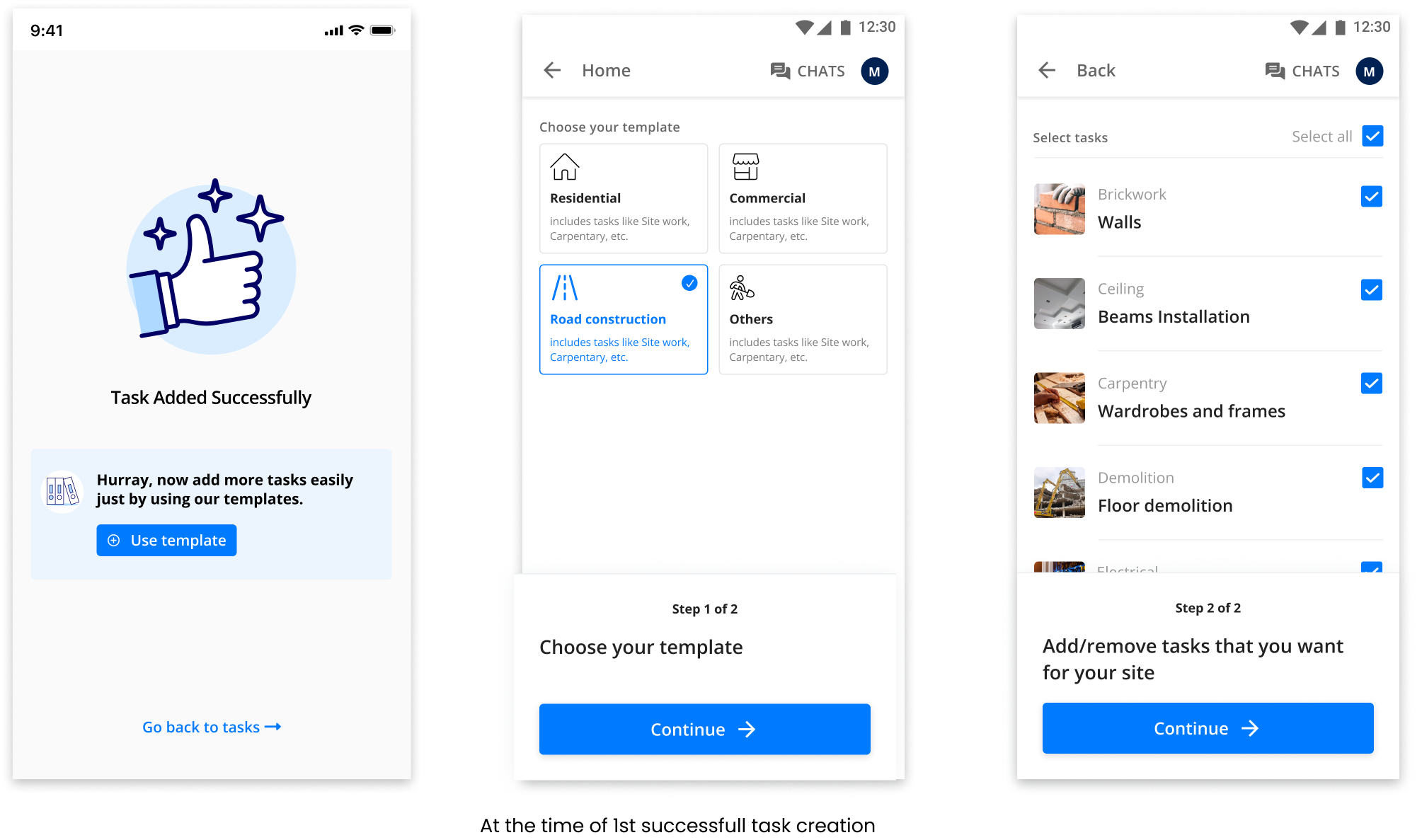
Apart from these there are certain different nudge points are there, but these are the more important ones. Now the next thing is the priortization, among all these we need to indentify one that would go live for the new users.
From all of these we prioritized the first one reason being is -
Also for this experiment one of the riskiest assumption we have taken is that “What if users didn’t find the tasks relatable according to their work?” To make sure all tasks are fine, we conducted 1-1 user calls + check data to create the new task list that resonates with the users. First we conducted user calls and for that we got the data of users from business & success team.
The only thing that remains little difficult for me in this industry is user calls, yes I love talking with users but in construction industry it’s very hard to get insights from the users, main problem arises when users didn’t answers the call. Even I had to drop a few calls because of the language they speak. But after conducting 30+ user calls, we were able to get some insights on the type of tasks they create.
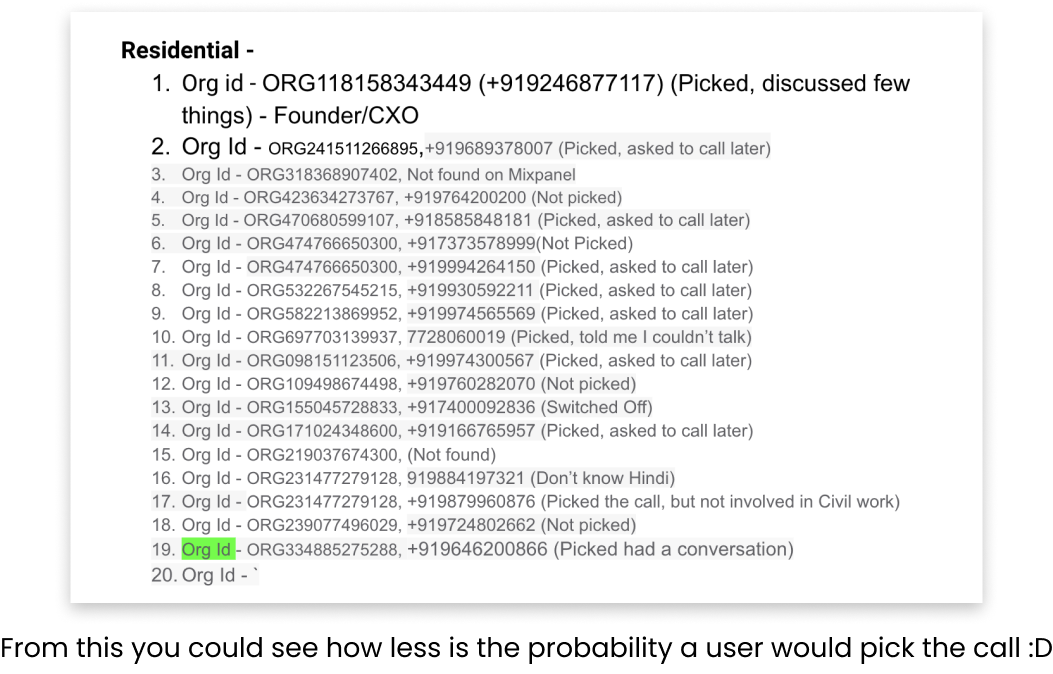
Goal - To better understand what types of tasks a user creates and how their current process looks like. What kind of tools do they use to create tasks or do things?
Here are the questions I asked, I formated the questions in Hindi, as users understand that language only -
From these user calls, the main motive is to understand the type of tasks they create and how’s their journey looks like. Upon overall analysis we had created a set of tasks in multiple categories such as Residential, Commercial etc. Apart from this we also checked the tasks created by users in the application already, we segregated data and build clusters based upon similarity of the type of project. But, the tasks we were able to identify are the general one and not that deep.
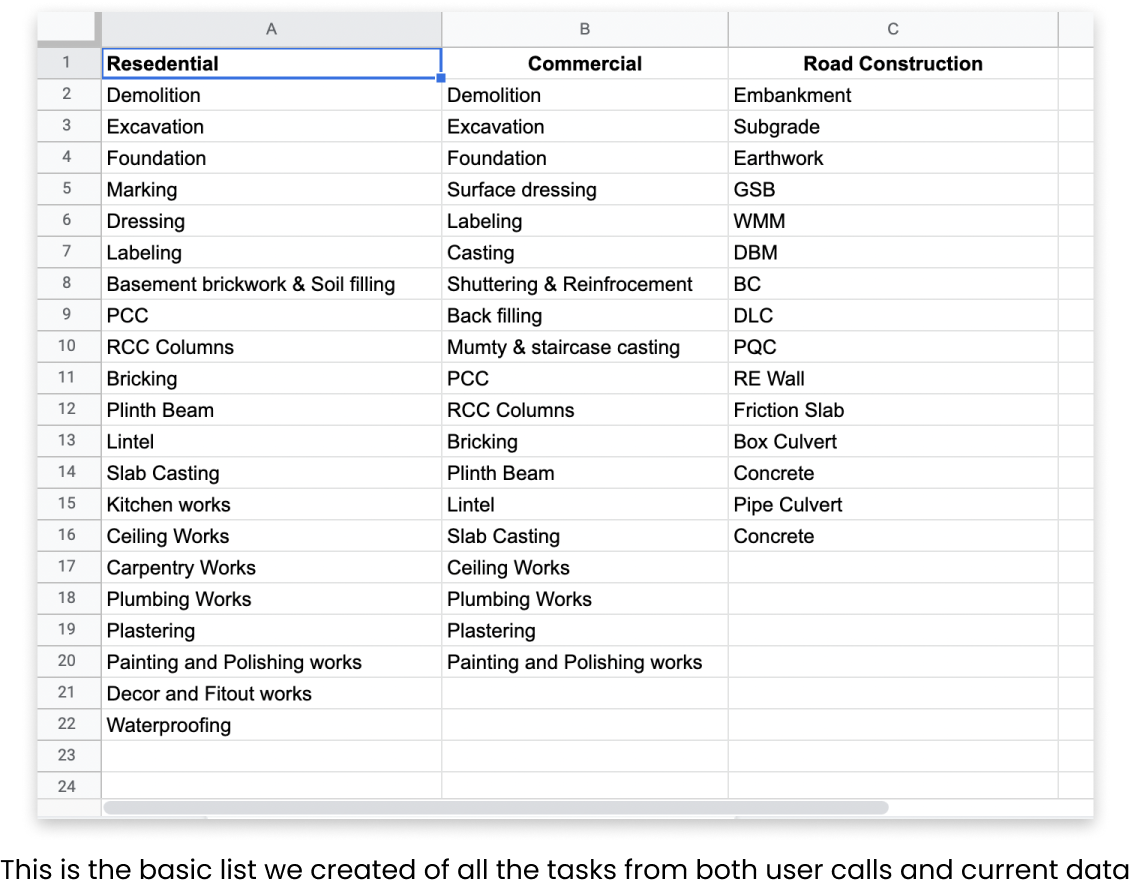
Now we have the basic tasks lists and experiment ready, the time is to launch the experiment with a limited set of users. But before this there are certain events that are also needed to track the user behavior. Basically creating events helps us understand what does user actually do when they perform any action?
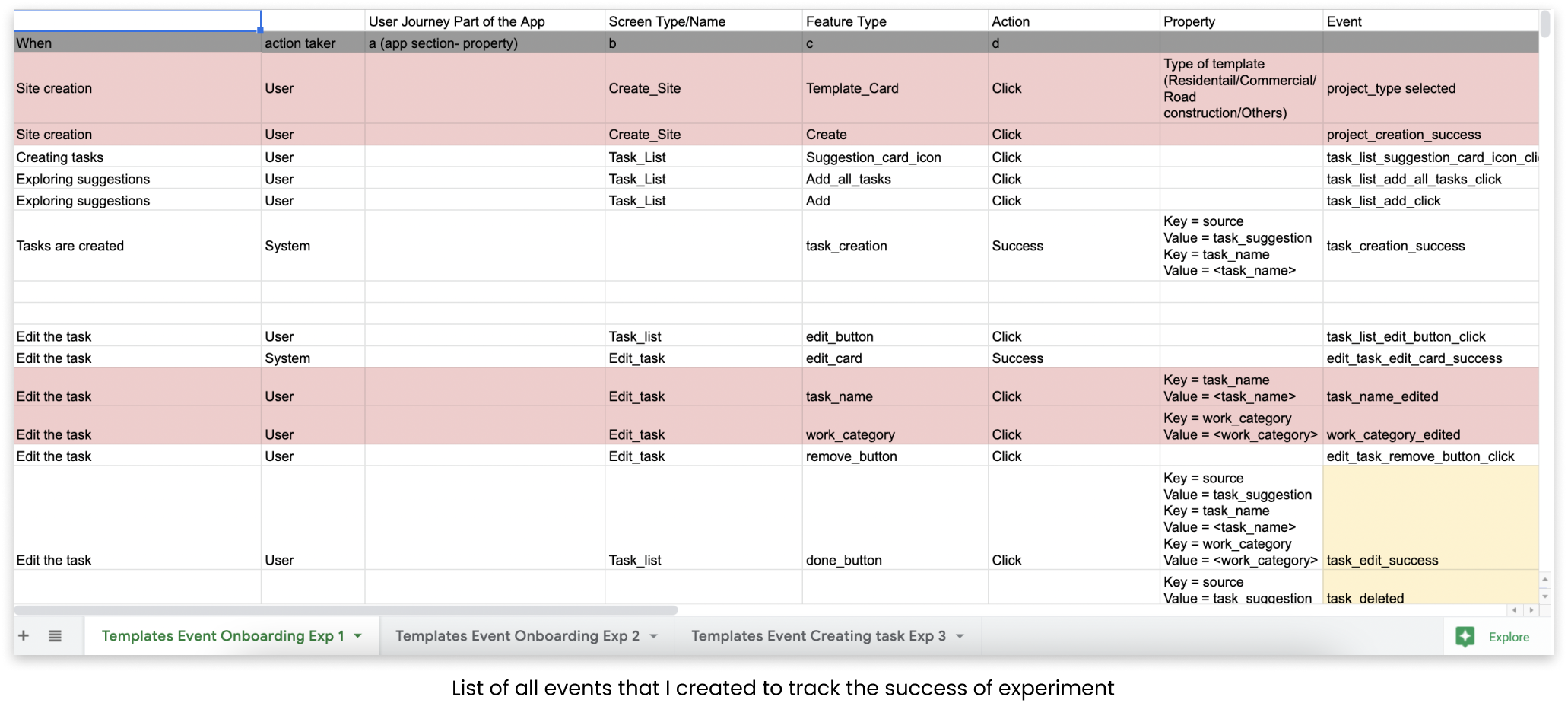
Even before creating the events we have shared the idea of the experiment with the developers, so that they could also have context and could prepare for the sprint, finally we handover the experiment to the dev team. Based upon the technicalities and suggestions we made a few changes and finally launched it with the 14% of new user base.
This experiment works very well and we got some good numbers, there’s almost 12% increase as compared to the past numbers. Our 10+ Task creation rate almost becomes 12 times, but the task log % is not that high but still better than the past one’s.
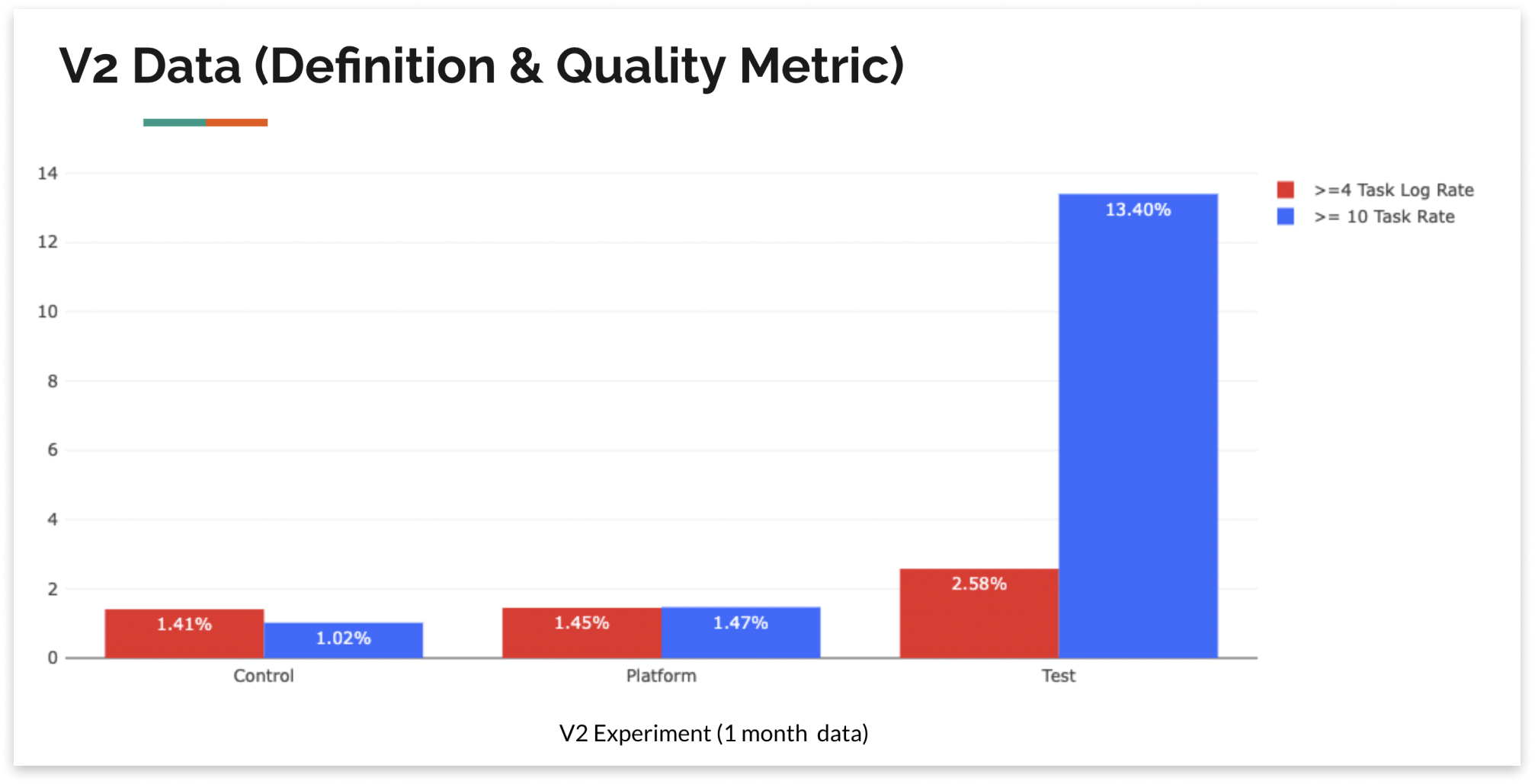
We have also checked the retention data of that cohort and that’s also positive and had increased as compared to the platform wise, but again number is not that high. So, we go through the user recordings and did a lot of user calls to understand user behaviours and their expectations from the templates. Upon completely analysing things, these are the major insights that come out -
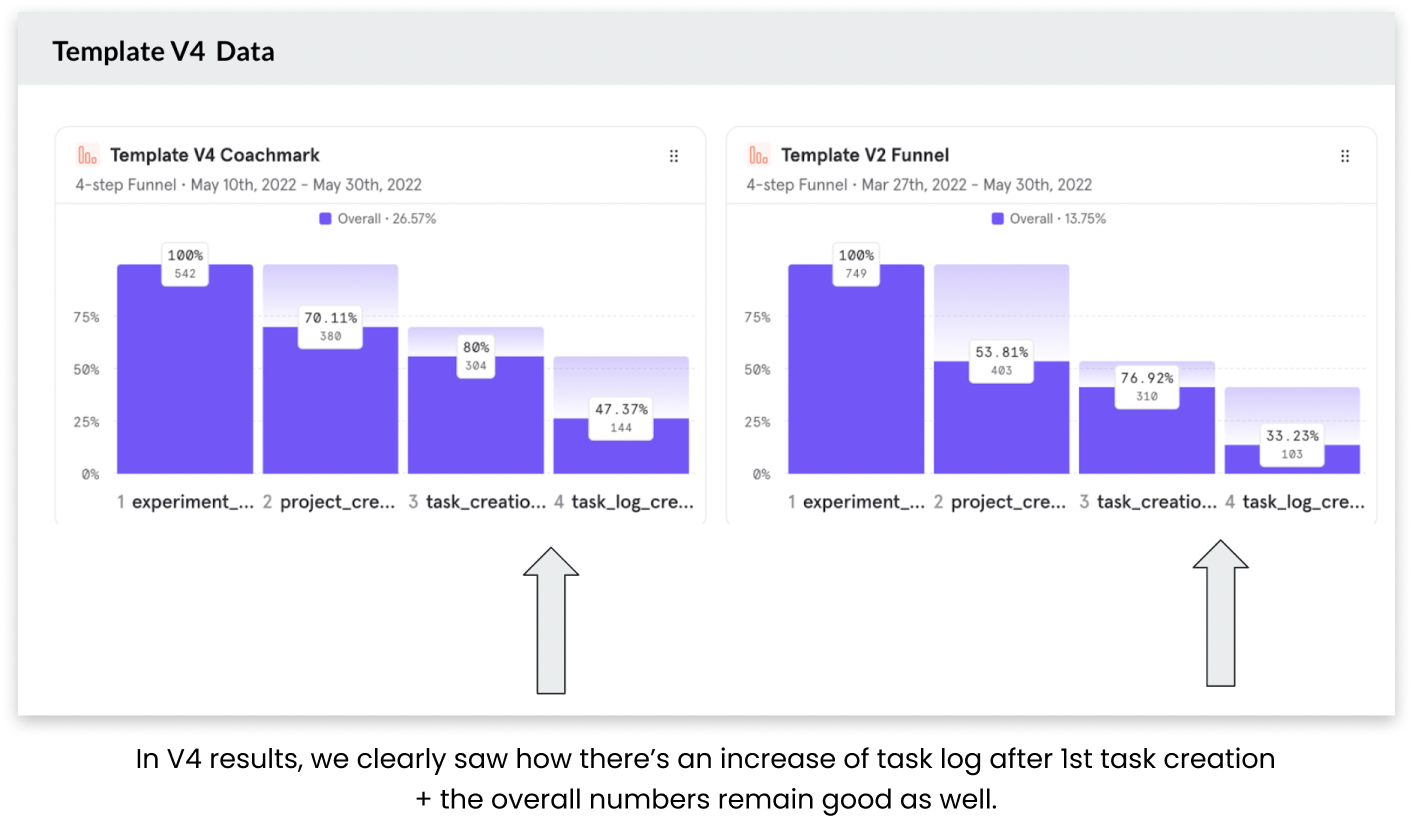
To solve all these challenges, we tried to modify a few things and test it again with the users, here are the changes -
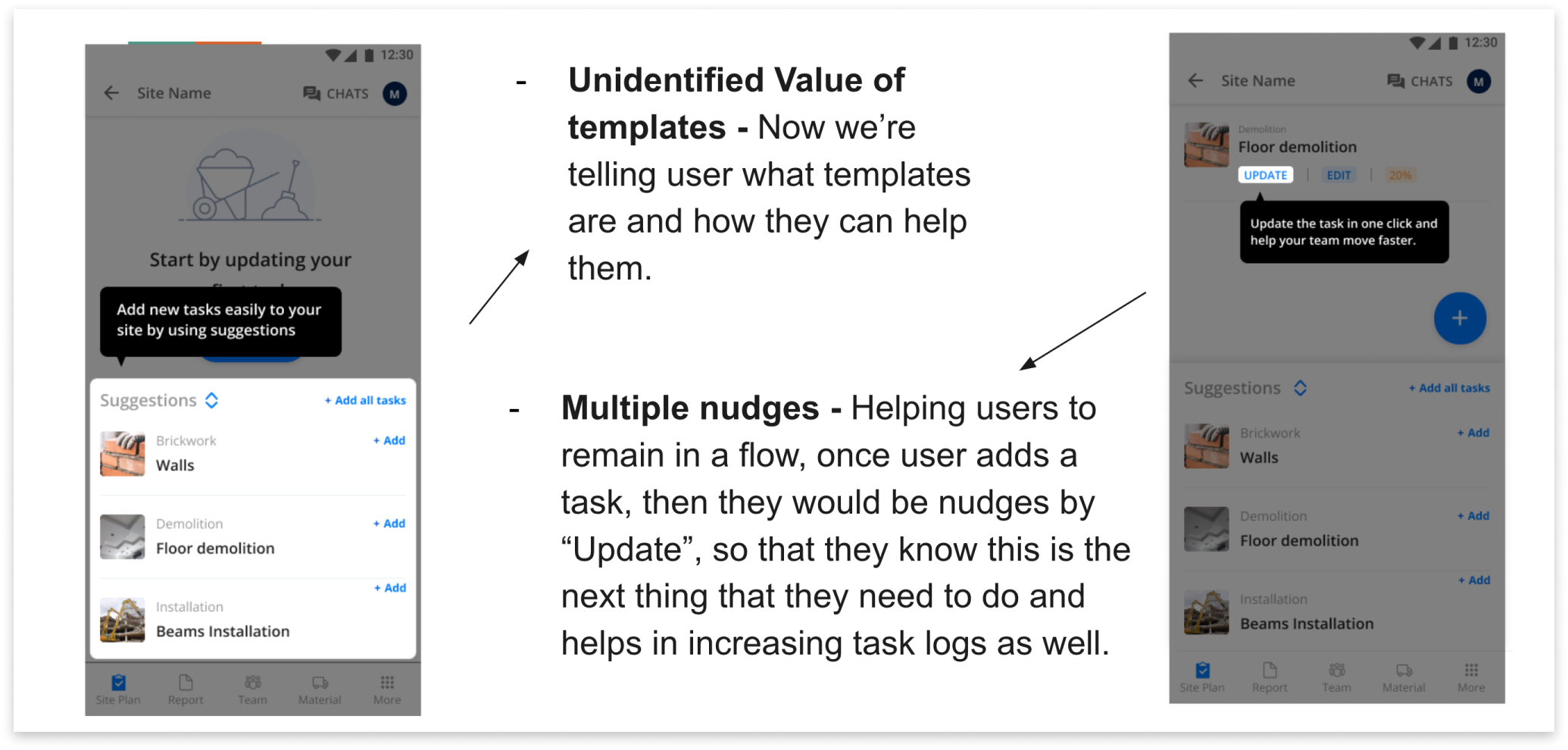
Now, in the first design we’re trying to tell the value of templates and how it could help them, in the 2nd screen as soon as user adds a task we’re nudging user with the “Update task” coach mark, this would help the user to remain in a natural flow and helps us to increase the task logs as well.
For the 1st problem of suggestion card, we had given elevation to the card + make the icon bigger, so that user could differentiate between the task lists and the suggestion card.
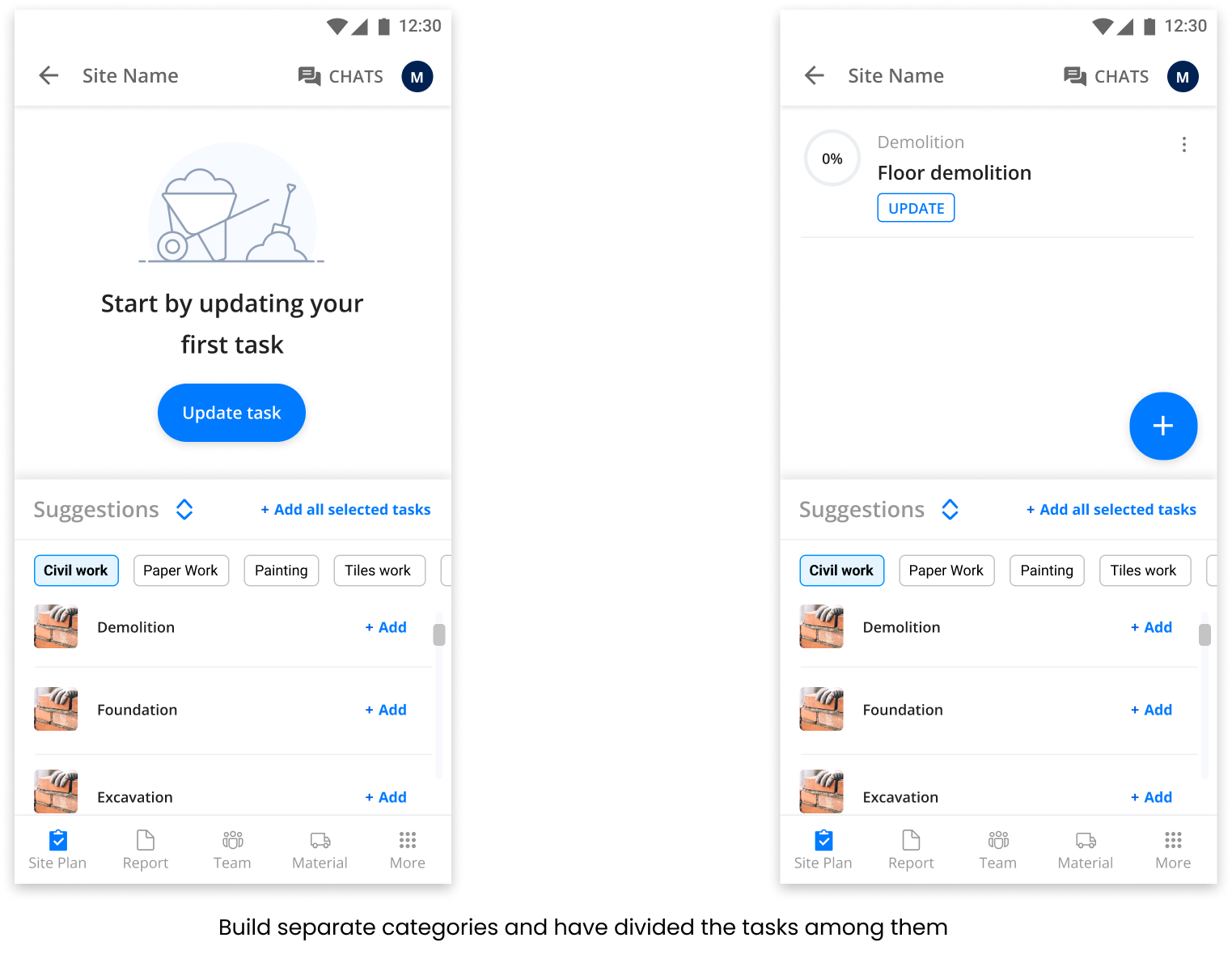
After this we tried few more versions as well, to test multiple things, and finally we did our last experiment i.e. V6, in this we have categorized tasks structurally and give proper categories to the tasks, and we believe this would perform the best, but results shows us something else -
When we saw the results after 1 week, we saw our quality metric is down as compared to the “Control” version. Also, the base metric i.e. 10+ Task creations is also low as compared to past experiments, but better than the control. So, we did a RCA to understand why this is happening, two major reasons come into the notice -
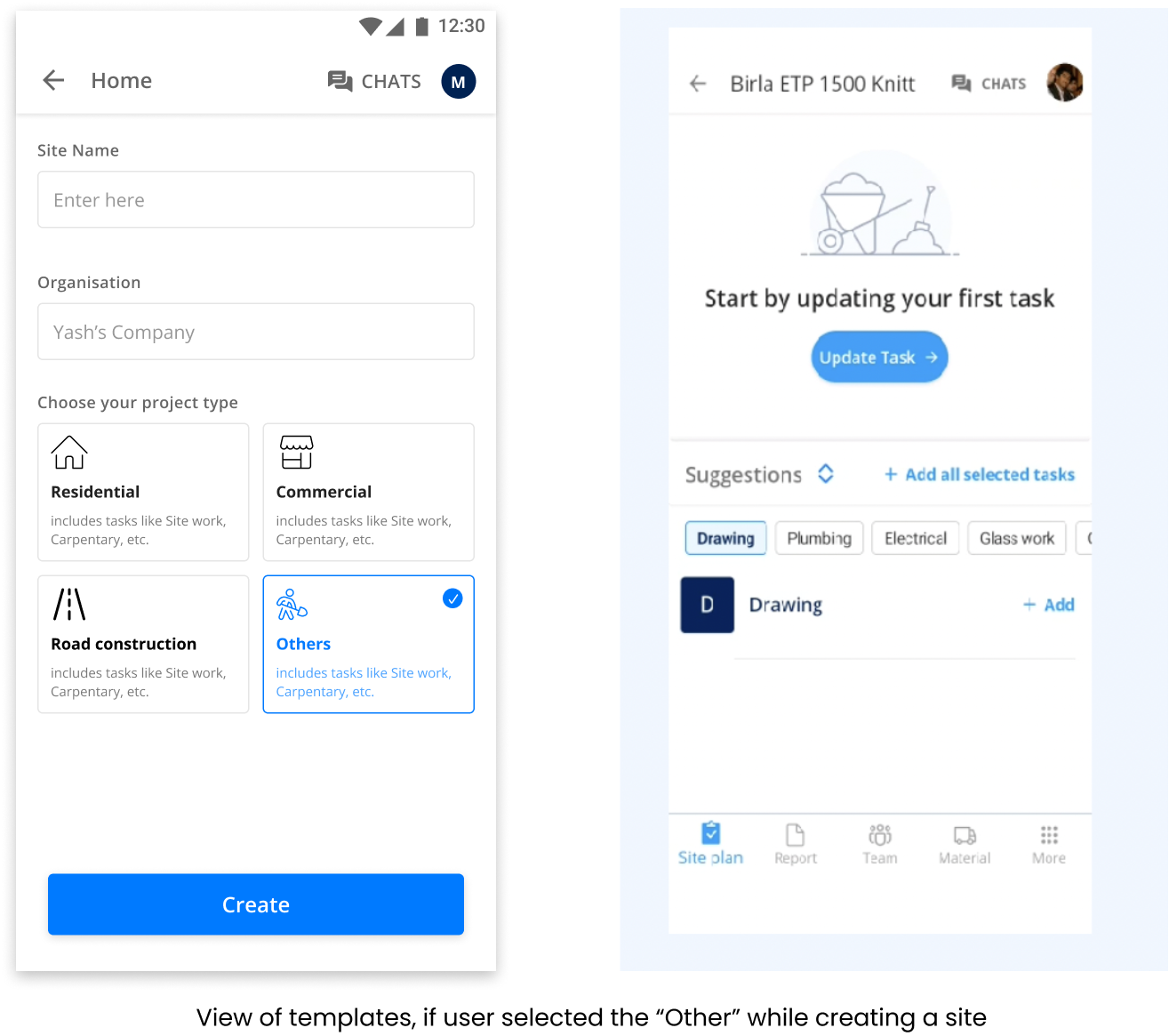
After improving the 2nd critical issue, we saw our base & quality metric comes to normal, but still the retention data looks low as comapred with the Control.
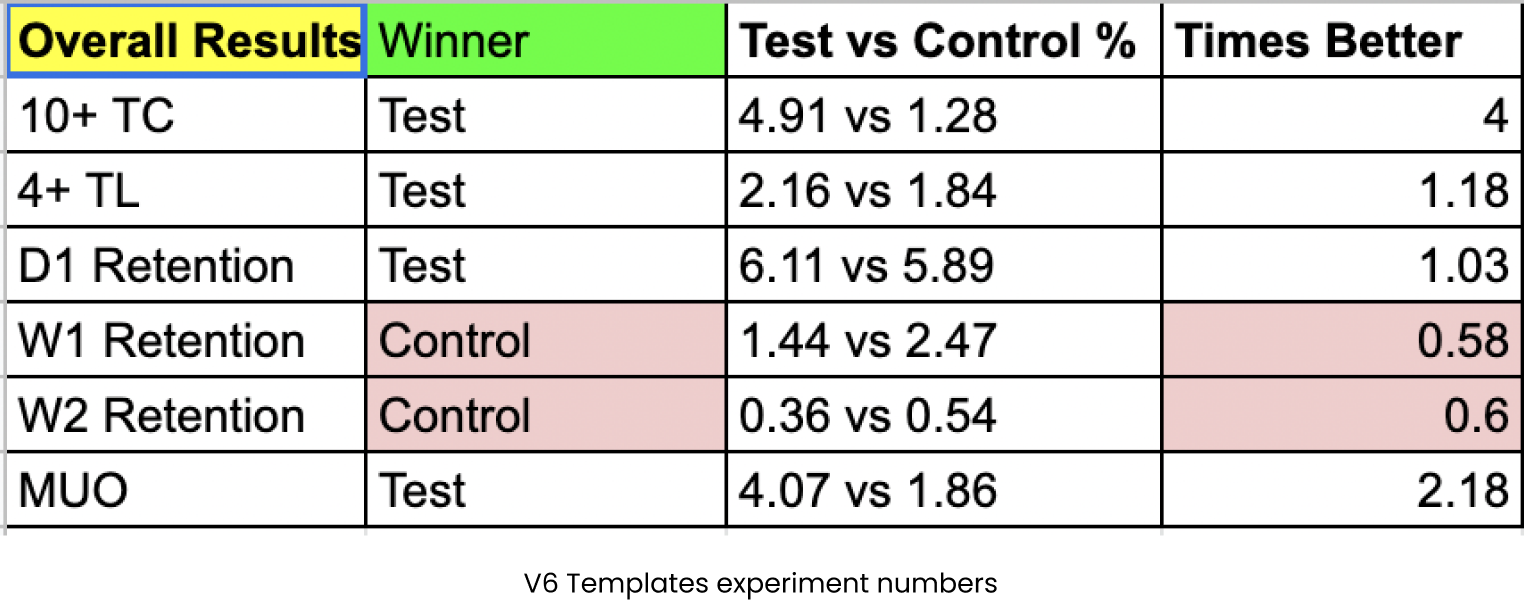
Overall our numbers look good, so we decided to launch this experiment to 100% of the users, but before that we need to check with all other PODs/team members to identify how launching might affect their numbers, upon collaborating with all team members, we got to know Activation POD launches an experiment as well that collides with our user journey, so to resolve the same, we did A/B testing where we want to indentify which user flow helps us build the best for our users. This in itself is another great story, in which there are multiple blockers and learnings but ending this case study here for now :)
Among plenty of learnings, few I priortized are -